Article
Why blacking out text in a PDF often fails
A black rectangle drawn over a paragraph looks like the text is gone, but in most PDF editors it is not. The letters you covered are still stored in the file as selectable characters; the box is just a new shape sitting on top of them. Copy the page, search it, or open it in a different viewer, and the "redacted" sentence can reappear. Here is why that happens, and a redaction method that actually removes the text instead of hiding it.
A shape on top is not a deletion
A PDF page keeps two things separately: the text objects, each one a character with a position and a font, and the drawing objects placed on the page, which include any rectangle, highlight or annotation you add. When you draw a black box in a PDF viewer, you are adding a new drawing object above the existing text objects. The page now looks redacted because the box visually covers the letters. Nothing tells the file to remove the text objects underneath, so they stay exactly where they were, at the same position, with the same content.
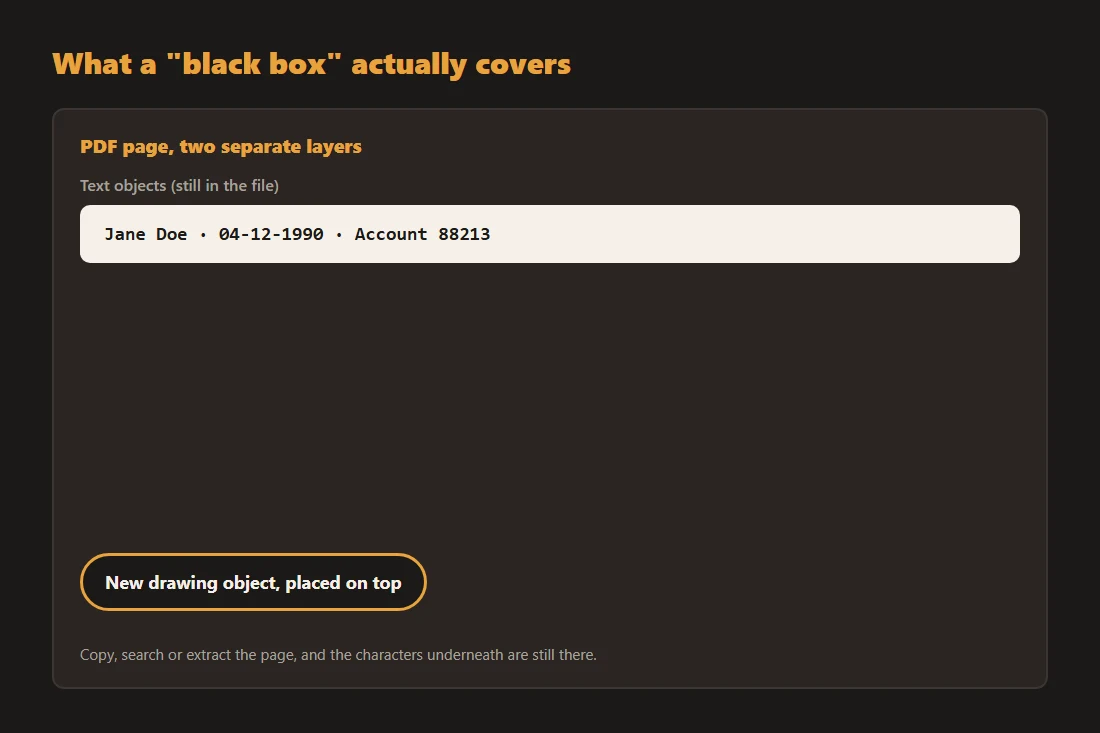
How the original text resurfaces
Because the text objects never left the file, four ordinary actions can expose them: selecting and copying the "blacked-out" line, running a text search across the document, extracting the raw text with any PDF-to-text tool, or opening the file in a viewer that renders text objects above drawing objects in a different order. None of these require special skills. This has happened publicly more than once: PDFs released with black boxes over sensitive passages turned out to still contain readable, copyable text underneath, and the mistake made the news instead of staying hidden.
Turning the page into an image first
The fix is to remove the text layer before you redact, not after. Convert the PDF page to a plain image with a tool like pdf-to-image, then draw over the sensitive area on that image with image-redact. At that point there are no text objects left on the page, only pixels, so the box is not sitting on top of anything recoverable. Reassemble the redacted images into a PDF with image-to-pdf and the previously sensitive text simply does not exist anymore, only a picture of a page with part of it covered.
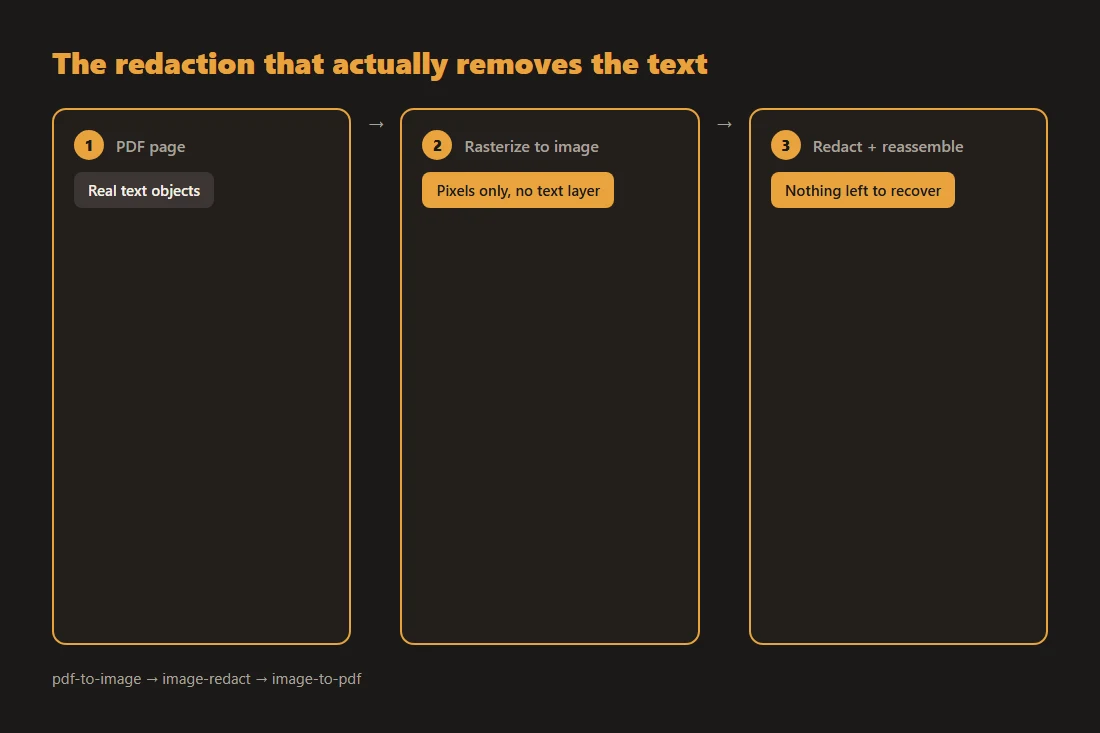
What this trades away
Rasterizing a page turns real, searchable text into a static picture, so anyone reading the redacted page afterward cannot select or search that page's text anymore, redacted or not. That is an acceptable trade for the page you are protecting: the alternative, keeping the text layer intact and hoping nobody checks, is exactly the mistake this article started with. If other pages in the same document carry no sensitive content, you can leave them untouched and only rasterize the pages that need it.
Use a solid box, and check the metadata too
For text, a fully opaque black or solid-color box is the safer choice; a blur filter can sometimes be worked backward for large, plain text if the blur is light, so it is better suited to faces or photos than to sentences. Redacting the visible page also does not touch the file's metadata: author name, software version, GPS coordinates on embedded photos, or edit history can leak separately from the page content. If that matters for your document, check what your file's own metadata reveals before you share it.
Tools in this article
Frequently asked questions
Does drawing a black rectangle in a PDF viewer actually delete the text underneath?
Usually not. Unless the tool has a dedicated redaction feature that removes the underlying text objects, drawing a shape only adds a layer on top of the page. The original characters remain in the file and can be selected, searched or extracted with common tools.
Is blurring sensitive text safer than covering it with a box?
For text, no. A light blur applied to large, plain text can sometimes be reversed well enough to guess the original characters, especially with short words or numbers. A solid, fully opaque box, or removing the text layer entirely by rasterizing first, is the safer option for text; blur is better suited to faces or general photo content.
Does converting a PDF to images before redacting lose anything important?
It loses the ability to select or search text on the pages you convert, since they become plain pictures. For a page you are actively redacting, that is the point: the sensitive text no longer exists as extractable characters. Pages that carry no sensitive content can stay as regular PDF pages if you only rasterize the ones you need to.