Article
Everyday percentage calculations: tax, tips, discounts, and more
Percentages appear in nearly every financial decision: the sales tax added at checkout, the tip split at dinner, the discount stacked on a sale item, the margin your supplier talks about versus the markup you apply. The arithmetic is simple, but the confusion between similar-sounding concepts causes real errors. This article walks through the formulas, explains the common mix-ups, and shows how the percentage calculator on this site handles the arithmetic without any data leaving your device.
The core percentage formula
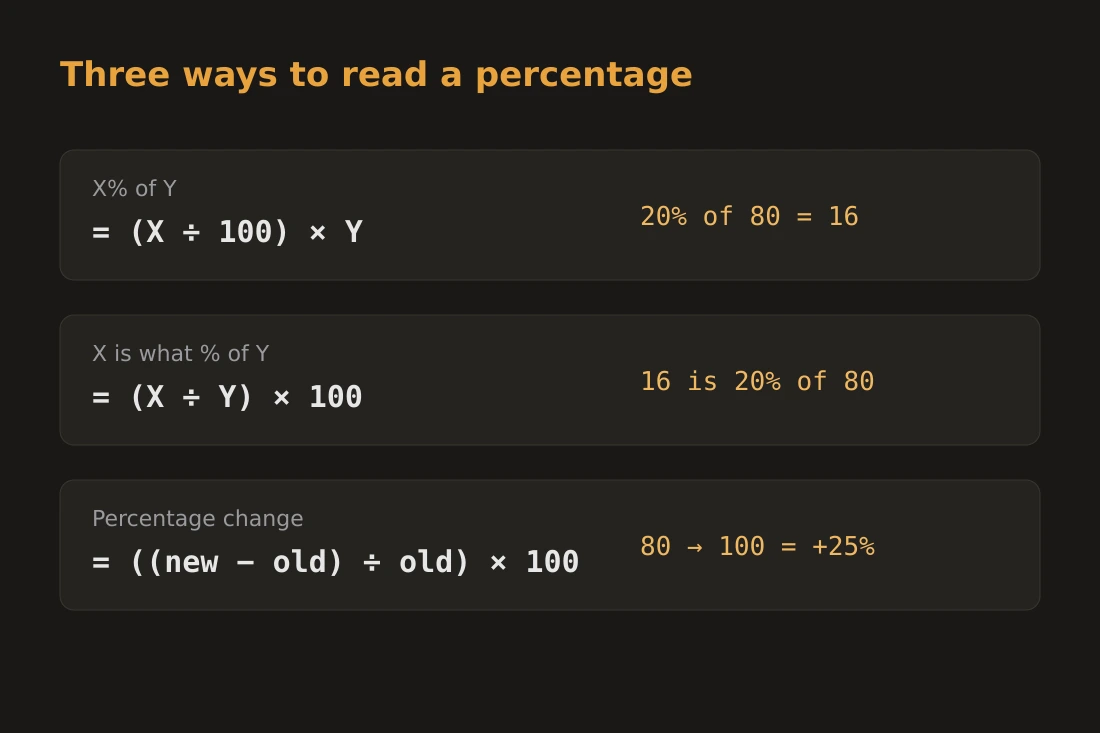
A percentage is a ratio expressed per hundred. The statement "X% of Y" means (X divided by 100) multiplied by Y. So 15% of 80 is (15/100) x 80 = 12. Reversing the question gives you two other patterns. "X is what percent of Y" means (X divided by Y) multiplied by 100: 12 is what percent of 80 gives (12/80) x 100 = 15%. Percentage change measures how a value moves from one point to another: ((new minus old) divided by old) multiplied by 100. If a price rises from 40 to 46, the change is ((46 minus 40) divided by 40) x 100 = 15%. A negative result means a decrease. Percentage point is different from percent: if a rate moves from 4% to 5%, it increased by 1 percentage point but by 25% in relative terms. Mixing these two up is one of the most common errors in financial reporting.
Tax, tips, and reverse-calculating a pre-tax price
Adding a tax or tip means multiplying the base amount by (1 plus the rate). A $60 meal with an 8% sales tax costs 60 x 1.08 = $64.80. A 20% tip on that pre-tax amount is 60 x 0.20 = $12, giving a total of $76.80. Splitting the total equally among four people means dividing $76.80 by 4, which is $19.20 each. Reverse-calculating the pre-tax price when you only have the final total is a common need. If $64.80 includes 8% tax, the pre-tax amount is 64.80 divided by 1.08 = $60. Dividing by 1.08 is not the same as subtracting 8%: subtracting 8% from $64.80 gives $59.62, which is wrong. The correct operation is always division by (1 plus the rate). This distinction matters when checking invoices or reclaiming VAT on a receipt that shows only the gross amount.
Single vs stacked discounts
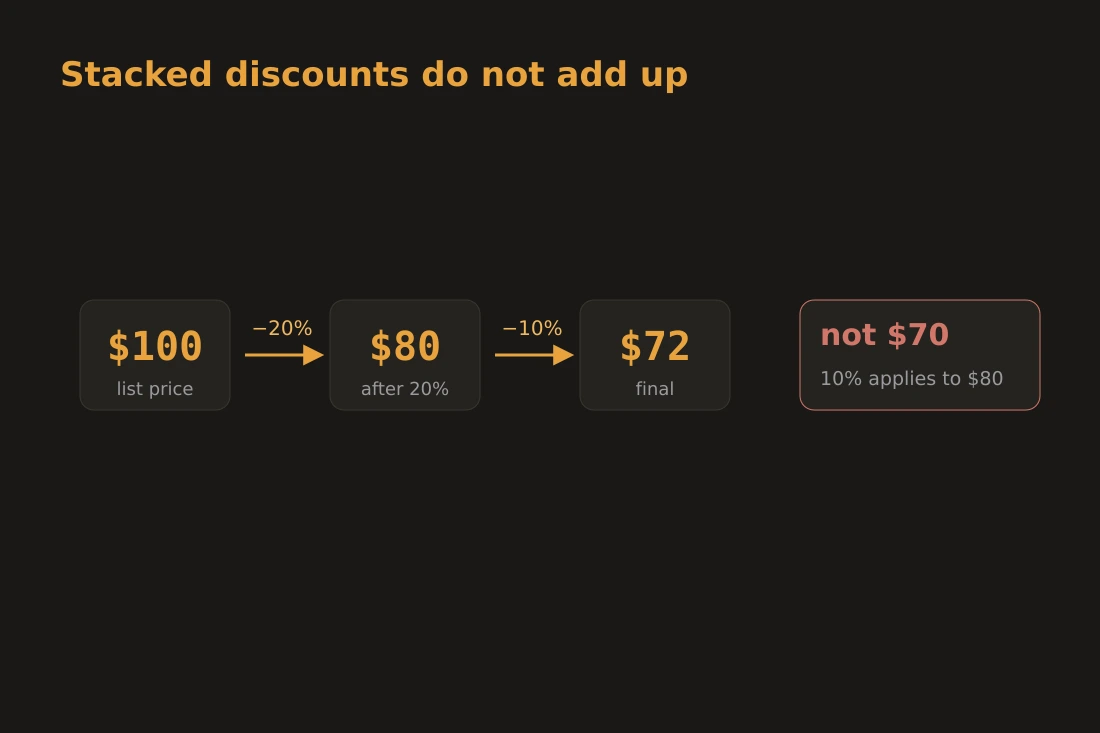
A single discount of 30% off a $100 item leaves $70. Stacked discounts do not add together. A 20% discount followed by a 10% discount applied to the reduced price gives: 100 x 0.80 = $80, then 80 x 0.90 = $72, not $70. The combined effect is 28%, not 30%. In general, two successive discounts of a% and b% are equivalent to a single discount of (a plus b minus ab/100)%. For 20% and 10%: 20 + 10 minus (20 x 10)/100 = 28%. Retailers sometimes present sequential promotions in a way that makes them look equivalent to a larger single discount. A coupon for 20% off an already-discounted item is not the same as a 20% price reduction from the original price. Running the numbers with a percentage calculator before purchase shows the actual savings. The same principle applies in reverse when applying a discount and then a tax: a 20% discount then a 20% tax does not return to the original price. Starting at $100: after the discount you have $80, after 20% tax you have $96, not $100.
Markup vs margin: different formulas, same profit
Markup and margin both describe the gap between cost and selling price, but they use different bases. Markup is calculated on cost: markup% = ((selling price minus cost) divided by cost) x 100. Margin is calculated on the selling price: margin% = ((selling price minus cost) divided by selling price) x 100. If a product costs $40 and sells for $60, the markup is ((60 minus 40) / 40) x 100 = 50%, and the margin is ((60 minus 40) / 60) x 100 = 33.3%. These two numbers describe the same transaction, but confusing them produces errors in pricing. A supplier who quotes a 50% margin is not the same as one who quotes a 50% markup: the former implies a selling price of twice the cost, the latter implies a selling price 1.5x the cost. To convert a desired margin into the required markup: markup = margin / (1 minus margin). For a 33.3% margin, markup = 0.333 / 0.667 = 50%. Working through the formula rather than guessing prevents systematic underpricing.
Calculating privately in the browser
The percentage calculator on this site runs entirely in your browser. No numbers you enter are sent to any server. The tool handles four modes: X% of Y, X is what percent of Y, percentage change between two values, and increasing or decreasing a number by a given percentage. It does not have a dedicated markup-vs-margin mode; use the formulas from the section above with a plain calculator to check either figure by hand. Browser-based arithmetic removes the risk of transposition errors when working through multi-step problems: a 20% discount followed by an 8% tax on a quoted price involves enough steps that small errors compound. The percentage calculator does not require an account, does not store session data, and produces results that stay on your screen. For anyone handling financial figures where confidentiality matters, keeping the arithmetic local is a straightforward precaution.
Tools in this article
Frequently asked questions
Why is a 20% discount followed by 20% tax not a break-even?
Because the two percentages apply to different bases. The discount is taken from the original price, giving a reduced amount. The tax is then applied to that reduced amount, which is smaller. On a $100 item: after a 20% discount you have $80, then 20% tax adds $16, giving $96 total. The only way the two would cancel is if the tax were calculated on the original price, which is not how sales tax works. The operations are sequential and each uses the current amount as its base.
What is the difference between percentage points and percent?
Percentage points measure absolute change between two percentage figures. If an interest rate rises from 3% to 5%, it rose by 2 percentage points. Percent (relative change) measures how large that shift is compared to the starting value: a rise from 3% to 5% is a 66.7% increase in relative terms ((2/3) x 100). News reports often use "percent" when they mean "percentage points," which can overstate the significance of a change. A rate doubling from 1% to 2% is a 1-percentage-point increase, but a 100% relative increase.
How do I find the pre-tax price from a total that includes tax?
Divide the gross total by (1 plus the tax rate expressed as a decimal). For a total of $108 that includes 8% tax: 108 divided by 1.08 = $100. Do not subtract 8% from the total: 108 x 0.92 = $99.36, which is incorrect. The reason is that the tax was added to the net price, so to recover the net you must undo that multiplication by dividing. This is the correct operation for any reverse-tax calculation, including VAT recovery on receipts.