Article
What to redact before sharing a bank statement
Landlords, lenders and visa officers ask for bank statements as proof of funds or income, and most people send the PDF exactly as the bank produced it. The statement usually carries more than the reader needs: the full account number, the codes that identify your account for payments, and a month of unrelated purchases. This article goes through what the person checking your statement actually looks at, which fields are safe to black out, and how to redact them so the data is really gone instead of hidden under a box.
What the person checking your statement actually needs
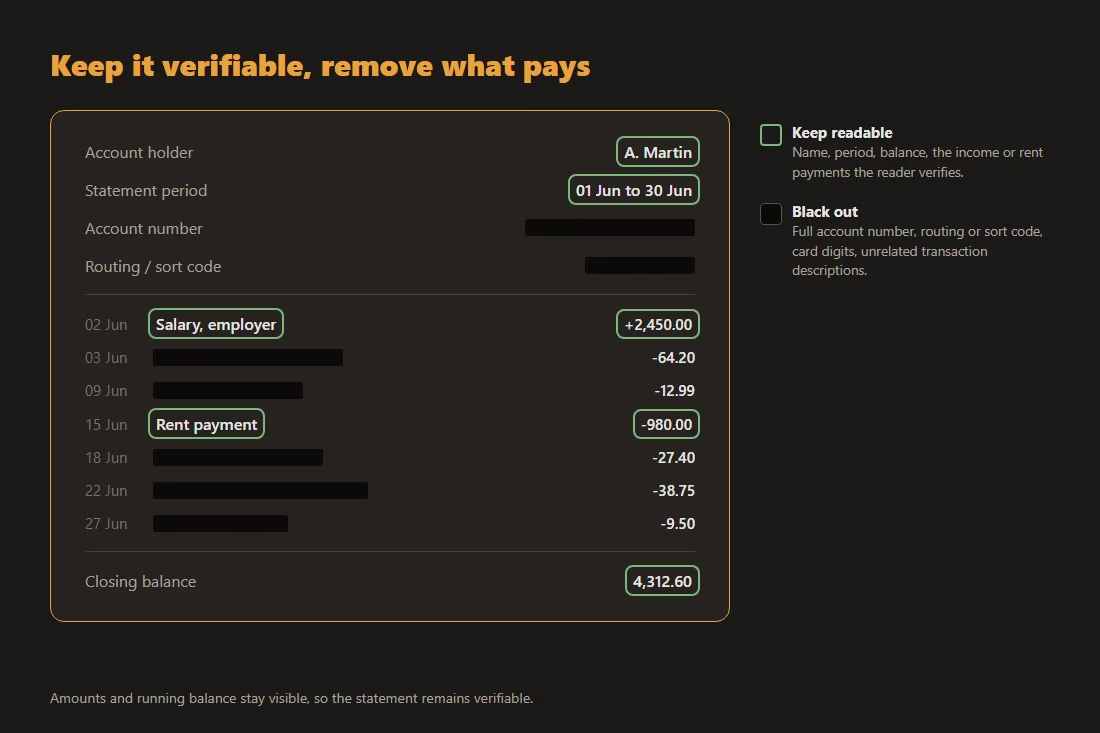
A landlord vetting a tenant is checking two things: that the statement is really yours, and that the money coming in or sitting there matches what you claimed. That means your name, the statement period, the balance and the recurring income or rent payments need to stay readable. A mortgage or loan officer reads the same fields plus the regular outgoings that affect affordability. A visa application mostly needs name, dates and balance. What none of these readers need is the ability to move money out of your account, and that is exactly what some of the other fields on the page enable.
The fields worth blacking out
The full account number is the main one, together with the routing number, sort code or local equivalent that identifies your account for payments; combined with your name and address, these are the classic ingredients of unauthorized direct debits and impersonation. Keeping the last three or four digits visible is usually enough for the reader to match documents. Card numbers printed next to card transactions deserve the same treatment. Unrelated individual transactions are a judgement call: a month of groceries, subscriptions and pharmacy visits tells a landlord nothing they need to know, and redacting those descriptions while leaving the amounts and the running balance visible keeps the document verifiable.
Why a black box in your PDF viewer does not work
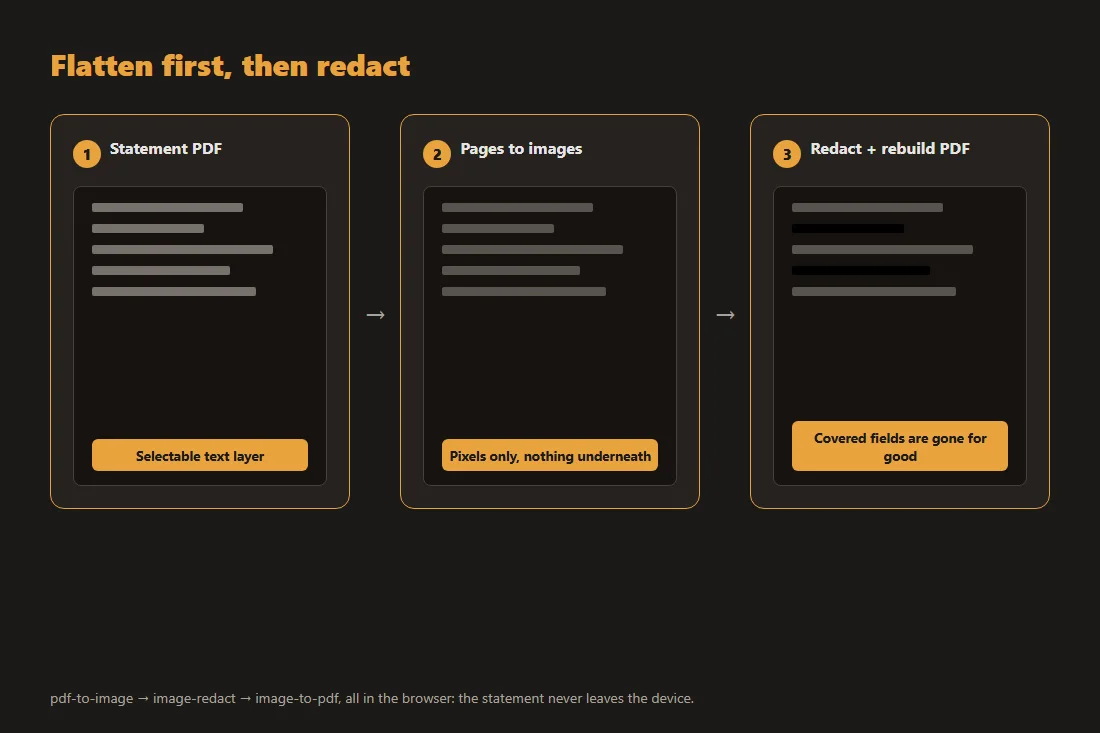
Bank statements are generated PDFs with a real text layer. Drawing a black rectangle or a highlight in a viewer adds a shape on top of that layer; it does not delete the characters underneath, and they remain selectable, searchable and extractable. Anyone who receives the file may recover the covered account number with a simple copy and paste. The mechanics of this failure, and the public incidents it has caused, are covered in our article on why blacking out text in a PDF fails; the short version is that covering is not removing.
A redaction method that actually removes the data
The reliable approach is to destroy the text layer before covering anything. First, convert the statement’s pages to plain images with pdf-to-image. Then black out the sensitive fields on those images with image-redact. A solid opaque box is the clearest choice; the tool’s other mode replaces each block with a single averaged colour, which is destructive too. What to avoid is a soft blur from some other tool, since a light blur on printed digits can sometimes be worked backward. Finally, reassemble the pages into a single file with image-to-pdf. The result contains no hidden characters: what you covered is gone, not layered over. All three steps run in your browser, so a document as sensitive as a bank statement never leaves your device during the process.
Do not over-redact
A statement with too much ink on it can fail at its one job. Redact your name, the period, the balance or every transaction, and the reader can no longer verify anything: the application stalls, or the document is rejected as unusable. Some lenders refuse statements with any alteration at all, so when the stakes are high, ask first what may be blacked out. And never change what the statement says: adjusting an amount or a date crosses from privacy protection into document fraud. Redaction should remove what the reader does not need, and nothing else.
Tools in this article
Frequently asked questions
Can a landlord insist on an unredacted bank statement?
They can ask, and some do. Practice and law vary by country and by how the request is justified, so if you prefer to redact, say so up front and offer to keep everything they actually verify readable: name, dates, balance and the relevant payments. Many will accept that. If they will not, you can decide whether to provide the full document or look elsewhere.
Should I keep the last digits of the account number visible?
It usually helps. The last three or four digits let the reader match the statement against other documents you provided, like an application form or a deposit reference, without exposing the full number. Blacking out everything except those digits is the common middle ground on shared financial documents.
Is a photo or scan of the statement safer than the PDF?
A photo or scan has no hidden text layer, so it avoids the copy-paste risk of a covered PDF. But it can carry other data: photos often embed the capture date, the device model and sometimes GPS coordinates, and a scan does nothing about fields you left visible. Rasterizing the PDF and redacting the images gives the same no-hidden-layer property with better legibility and no camera metadata.