Article
Converting between CSV, XML, JSON, and YAML: a practical guide
CSV, JSON, XML, and YAML are the four formats developers encounter most often in data pipelines, config files, and APIs. Converting between them is straightforward when the data models match, and surprisingly lossy when they do not. This guide covers what each format can and cannot represent, where information disappears during conversion, and the encoding pitfalls that cause silent corruption. The data-converter tool on this site handles three of the four (CSV, JSON, and YAML) entirely in the browser; the XML sections here are background for when you move data by hand or with a separate tool.
The four formats and their data models
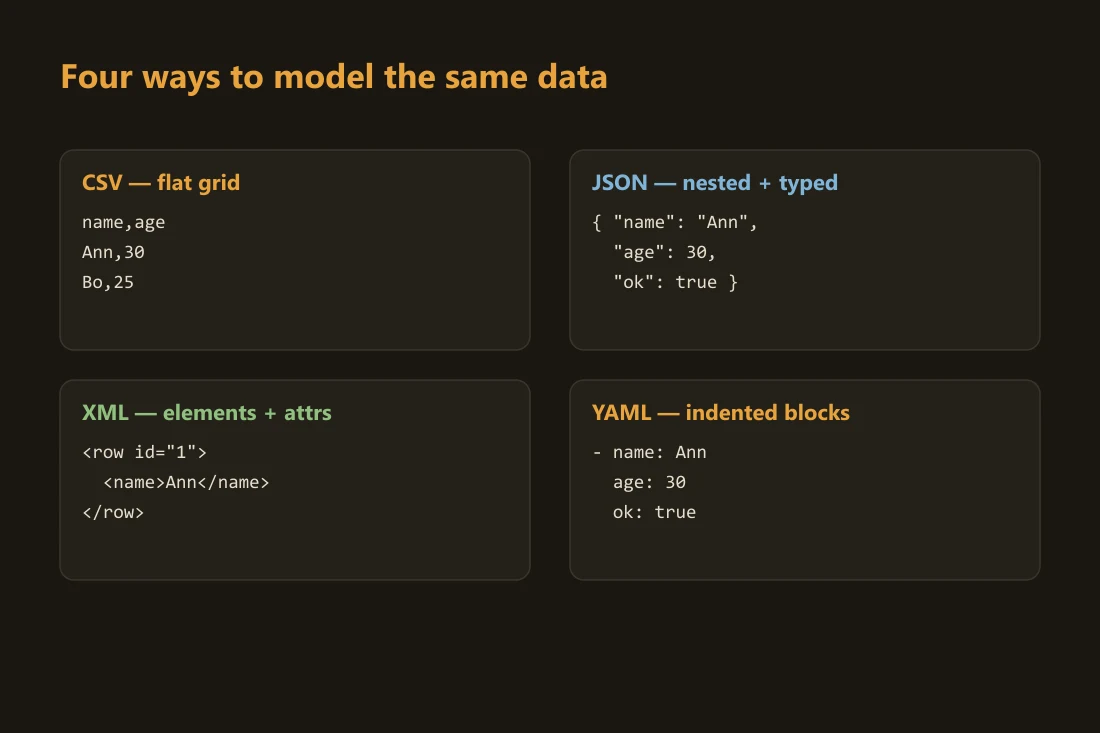
CSV organizes data as a flat grid of rows and columns. The first row typically names the columns; every subsequent row is one record. There is no nesting, no type information, and no standard for anything beyond plain text in cells. Every value is a string unless the consuming application imposes a type. JSON models data as a tree of objects (key-value maps) and arrays. Values can be strings, numbers, booleans, null, nested objects, or arrays of any depth. This lets a single JSON document represent a customer record with embedded address objects, line-item arrays, and typed numeric totals. XML models data as a tree of elements. Each element can carry named attributes and contain child elements or text content. There is no built-in numeric or boolean type; everything is text. Schemas such as XSD can enforce types at validation time, but the wire format is always character data. YAML uses indentation to express the same object-and-array model as JSON, with cleaner human-readable syntax. YAML is a superset of JSON: any valid JSON document is also valid YAML. It adds multi-line strings, comments, and anchor-alias references for repeated blocks. YAML is common in configuration files; JSON is common in API responses.
Lossy conversions: flattening and the XML ambiguity
The most common lossy conversion is flattening nested JSON or XML into CSV. A JSON object with a nested address field cannot map cleanly to a CSV row. The typical workaround is dot-notation column names: customer.address.city becomes its own column. This works for one level of nesting, but breaks completely when an array appears. A customer with three phone numbers requires either three separate columns (hard-coding the maximum count), splitting into a second CSV file, or encoding the array as a delimited string inside a single cell. None of these options round-trips back to the original JSON without extra metadata. XML introduces a separate ambiguity: the attribute versus child element choice. The value Paris could be stored as an attribute (<city name="Paris">) or as a child element (<city><name>Paris</name></city>). When a converter reads XML and produces JSON, it must decide how to map attributes. Common conventions include prefixing attribute keys with @ or placing them under an "_attributes" key. The choice is not standardized, which means two converters reading the same XML can produce structurally different JSON. If you plan to round-trip data through XML and JSON, fix a convention before starting.
CSV pitfalls: delimiters, quoting, and encoding
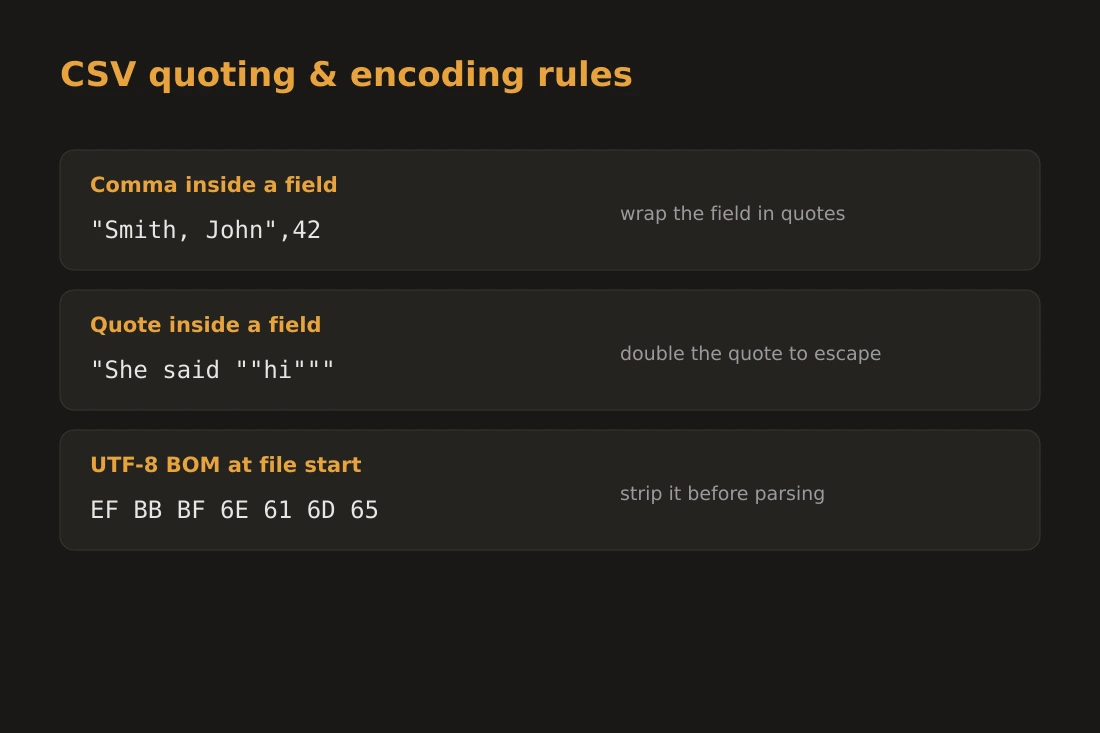
CSV has no single formal standard, only RFC 4180 as a widely cited reference. The most common delimiter is a comma, but semicolons (common in European locales where commas serve as decimal separators), tabs (TSV), and pipes all appear in practice. A file called .csv may use any of these without signaling which. When a field value contains the delimiter itself, RFC 4180 requires wrapping the field in double quotes: "San Francisco, CA". A double quote inside a quoted field must be escaped by doubling it: "He said ""hello""". A field containing a literal newline must also be quoted. Parsers that skip this step produce row-count errors that are hard to trace. Encoding is a separate trap. CSV files from Windows tools often carry a UTF-8 BOM (byte order mark: the three bytes EF BB BF at the start of the file). The BOM helps Excel identify the encoding, but many programming language parsers treat the BOM as part of the first column name, producing a column named "id" instead of "id". This breaks any downstream code that looks up columns by name. When reading a CSV file programmatically, strip the BOM before parsing, or use a library that handles it explicitly.
Choosing a format: config, interchange, and spreadsheets
Format choice is usually determined by context, not preference. JSON is the default for REST APIs and browser-to-server interchange. It is compact, natively parsed in every programming language, and carries type information for numbers and booleans. Its weakness is the absence of comments, which makes it unsuitable for files that developers read and edit by hand. YAML is preferred for configuration files (Kubernetes manifests, CI pipeline definitions, Ansible playbooks) because it allows inline comments and is easier to read than JSON with many levels of indentation. Its main risk is that indentation errors are silent: a mis-indented key moves to a different scope without any parse error. XML remains standard in older enterprise systems, SOAP web services, document formats (DOCX, SVG, RSS), and contexts requiring schema validation or namespace disambiguation. It is verbose, but XPath and XSLT tooling is mature. CSV is the right choice when the data is genuinely flat and the consumer is a spreadsheet application or a data analyst. It is not suitable for configuration or API interchange because it has no type system and no nesting.
Doing it locally with data-converter
The data-converter tool on this site parses and converts between CSV, JSON, and YAML entirely inside the browser; it does not read or write XML. No data is transmitted to a server at any point. The conversion runs in your local JavaScript runtime, and the output is available for download or copy without anything leaving your device. This matters for data that is not yours to share: API responses containing personal information, configuration files with internal hostnames, or CSV exports from internal databases. Pasting that data into a web-based converter that runs on a server means the content is sent over the network and processed on hardware you do not control. With data-converter, the browser tab is the processing environment. The tool applies RFC 4180 quoting when reading or writing CSV, and expects a flat array of objects for JSON or YAML going to CSV: a nested object or array value under a key gets no automatic dot-notation flattening, so flatten those fields yourself before converting if you need them as separate columns. If you need to move data to or from XML, convert it to JSON or YAML with a dedicated XML tool first, then bring the result here.
Tools in this article
Frequently asked questions
Can I round-trip JSON through CSV and get the original back?
Only if the JSON is a flat array of objects with no nested fields and no arrays as values. The moment you have a nested object or an array value, the CSV representation requires a structural decision (dot-notation columns, multiple rows, or encoded strings) that cannot be automatically reversed. If your data has nesting, JSON, XML, or YAML will round-trip cleanly; CSV will not.
Why does my CSV look wrong in Excel after exporting from a European application?
European locales often use semicolons as the CSV delimiter because commas are reserved for decimal notation. Excel on a European locale expects semicolons. If the file uses commas, Excel treats the entire row as a single column. The fix is either to change the delimiter in the export settings, or to use Excel's Data Import wizard, which lets you specify the delimiter manually. The UTF-8 BOM issue is separate: without a BOM, Excel may also misread accented characters as garbled text.
What is the difference between YAML and JSON in practice?
Both represent the same underlying data model: objects, arrays, strings, numbers, booleans, and null. YAML adds comments (lines starting with #), multi-line string literals, and anchor references for repeated blocks. JSON is strictly a subset of valid YAML, but JSON parsers do not read YAML. The practical rule: use JSON for API payloads and data storage; use YAML for configuration files that humans edit and that benefit from inline comments.