Article
Cleaning and preparing audio for a podcast
A raw voice recording usually needs three things before it is ready to publish: a consistent loudness level, a format and bitrate that streaming platforms expect, and an honest assessment of what noise removal can actually deliver. This article covers those steps using audio-volume, vocal-remover, and audio-converter, all running locally in the browser.
Loudness vs peak: why LUFS matters more than peak level
Peak level measures the single loudest sample in an audio file. Loudness, expressed in LUFS (Loudness Units relative to Full Scale), measures the perceived energy over time. A podcast recorded at -3 dBFS peak can still sound quiet if most of the signal sits much lower. Streaming platforms and podcast directories normalize audio to a target loudness on playback, typically -14 LUFS for music services and -16 LUFS for spoken word, so submitting at a very different level means the platform will turn your audio up or down anyway. Targeting -16 LUFS integrated loudness gives you a finished file that matches the platform default, stays consistent with other shows, and leaves a little headroom before the digital ceiling at 0 dBFS. The true peak, which accounts for inter-sample overs, is usually kept below -1 dBTP. Aiming for these two numbers together gives a cleaner result than chasing a peak target alone.
Gain and normalization with audio-volume
audio-volume lets you adjust the gain of a file in decibels or apply loudness normalization. If a recording is consistently quiet, adding gain in dB raises the whole signal by a fixed amount. The risk is clipping: if any peak already sits close to 0 dBFS, a positive gain offset will push it over, introducing digital distortion. Check the waveform before applying gain, and keep the true peak below -1 dBFS after the adjustment. Loudness normalization takes a different approach. The tool runs FFmpeg's loudnorm filter at its default target of -24 LUFS integrated loudness, rather than the louder targets some podcast platforms recommend. Single-pass loudnorm is a dynamic process, not a flat gain offset: it tracks loudness over time and adjusts the signal to converge on the target, which can behave a little like light dynamic-range compression on an inconsistent recording. For a voice recording with big level swings between sentences, a dedicated compressor or limiter applied before normalization still gives a more controlled result, but those steps fall outside what audio-volume handles.
What center-channel cancellation can and cannot do
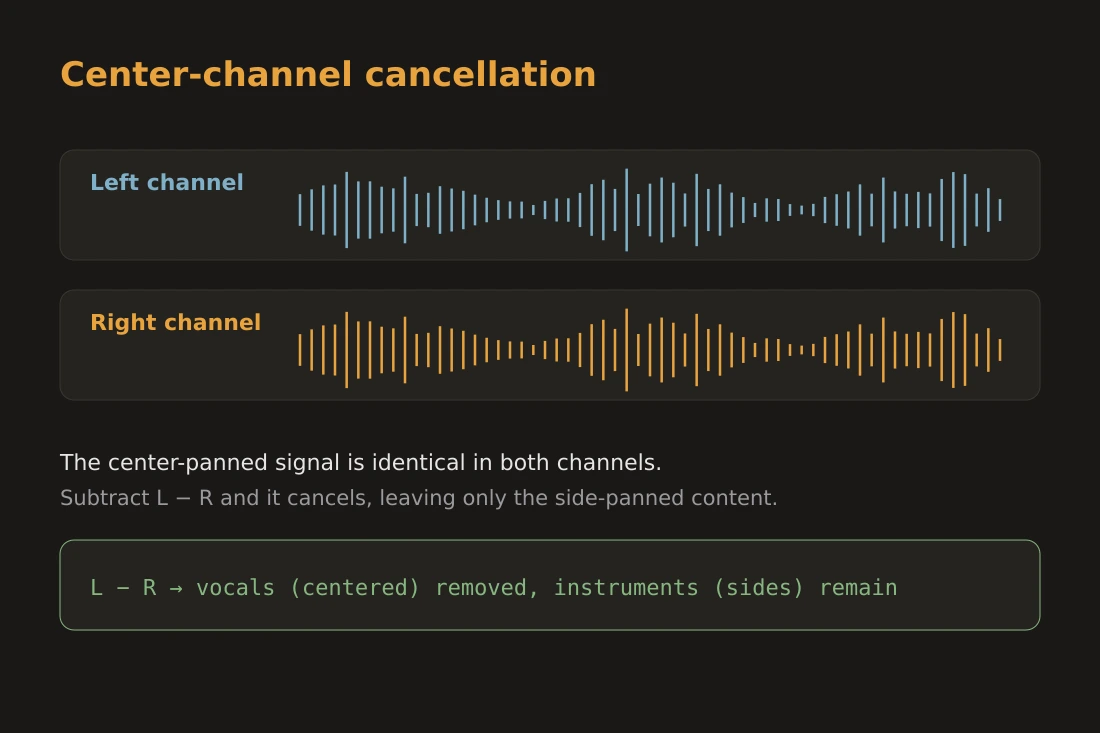
vocal-remover applies a center-channel cancellation technique. In a stereo file, a signal that appears identically in both the left and right channels at the same level and phase is said to be center-panned. Subtracting the right channel from the left removes anything sitting in that center position, leaving mostly the content panned to the sides. This is what creates the karaoke effect on a commercially mastered music track where lead vocals are typically center-panned. It does not detect or separate voices using any model of speech. It does not remove background noise, room reverb, HVAC hum, or traffic. It does not isolate your podcast voice from ambient sound in a single-channel or mono recording, where there is no phase difference to exploit. The result also degrades stereo width on the retained content. For a podcast track recorded in a noisy room, center-channel cancellation is the wrong tool. Acoustic treatment, a directional microphone, or a gate plugin in a dedicated audio editor are the practical options for background noise.
Exporting for distribution: format, bitrate, and mono vs stereo
Most podcast directories accept MP3 and AAC. MP3 is the most compatible choice; every player and platform supports it. AAC at the same bitrate is slightly more efficient but requires a supported container such as .m4a. For a single voice podcast, 64 kbps mono MP3 is generally enough: speech occupies a narrow frequency range, and mono removes any channel redundancy. If your show has music, sound effects, or multiple hosts panned for effect, 128 kbps stereo gives the extra headroom. Going above 128 kbps for speech gives no audible improvement and increases file size, which affects download time for listeners on slow connections. A 60-minute episode at 64 kbps mono is around 28 MB; at 128 kbps stereo it is roughly 56 MB. Mixing down to mono before export also halves the data compared to stereo at the same bitrate. audio-converter handles the format and bitrate selection. Set the sample rate to 44.1 kHz for compatibility; 48 kHz is a video convention and not required for audio-only distribution.
Doing it locally: no file leaves your device
audio-volume, vocal-remover, and audio-converter all run in the browser using WebAssembly. The audio processing happens inside the browser's memory; the file is read from your local disk, processed entirely on your device, and the output is offered as a local download. Nothing is sent to any server. This matters for podcast production when the content is sensitive, an interview recorded before publication, a conversation under embargo, or simply a recording you do not want on a third-party server. The same constraint applies to limitations: the tools do what their implementation supports, not more. audio-volume applies gain and loudness normalization. vocal-remover applies center-channel cancellation. audio-converter converts format and bitrate. Each tool does one defined thing, and the output is whatever your local hardware can compute.
Tools in this article
- Audio volumeBoost, reduce or normalize the loudness of an audio file in your browser. No upload.
- Vocal remover (karaoke)Reduce centred vocals to make a karaoke track, in your browser. No upload.
- Audio converterConvert audio to MP3, WAV or AAC directly in your browser. No upload.
- Merge audio filesConcatenate multiple audio files (MP3, WAV, M4A, OGG…) into one. Drag to reorder. No upload.
Frequently asked questions
What is -16 LUFS and why is it the podcast target?
-16 LUFS is the integrated loudness level that most podcast apps and directories normalize to on playback. Submitting at -16 LUFS means your episode plays back at roughly the level you intended without the platform applying large automatic corrections. The value comes from the ITU-R BS.1770 standard for broadcast loudness, adapted by Apple Podcasts and Spotify for spoken-word content.
Can vocal-remover remove background noise from my podcast recording?
No. vocal-remover applies center-channel cancellation, which subtracts the signal that is identical in both stereo channels. Background noise in a podcast recording is not center-panned in a way that cancellation can target, and mono recordings have no channel difference to exploit at all. For background noise reduction, use acoustic treatment, a directional microphone, or a dedicated noise gate or spectral repair tool in an audio editor.
Should I export my podcast in mono or stereo?
For a single-voice recording, mono at 64 kbps MP3 is the standard choice. It halves the file size compared to stereo at the same bitrate and has no audible downside for speech. Use stereo if your episode has music, multiple hosts deliberately panned, or sound design that depends on channel separation.